
Blog
Why Choose an Enforcer Video Intercom for Global Security?
Modern security begins at the entrance. A visitor presses a call button, the camera captures a clear face, and staff respond from a nearby screen or mobile device. This simple exchange can shape safety, trust, and daily efficiency.
An Enforcer Video Intercom combines visual verification, two-way communication, and controlled access in one practical system. It can support offices, schools, warehouses, residential buildings, and remote facilities. Security teams can review visitor activity, confirm deliveries, and manage entry without standing beside every door. In my experience, the strongest installations begin with careful site assessment. Camera height, lighting, network stability, audio clarity, and user training matter as much as the device itself.
Details make the difference.
Bruce Schneier, a respected security technologist, once said, “Security is a process, not a product.” This principle applies directly to every Enforcer Video Intercom deployment. Technology can improve awareness, but it cannot replace thoughtful procedures or responsible human decisions. Clear visitor policies, regular maintenance, privacy-conscious configuration, and tested emergency communication remain essential.
No system is perfect.
A poorly positioned camera may create blind spots. Weak network planning can delay communication. Untrained staff may ignore useful alerts. These limitations deserve honest attention before installation. When properly designed and regularly reviewed, an Enforcer Video Intercom can provide a visible, reliable security layer across multiple locations. It helps organizations respond with greater confidence while keeping everyday access convenient, documented, and controlled.
What Is an Enforcer Video Intercom?
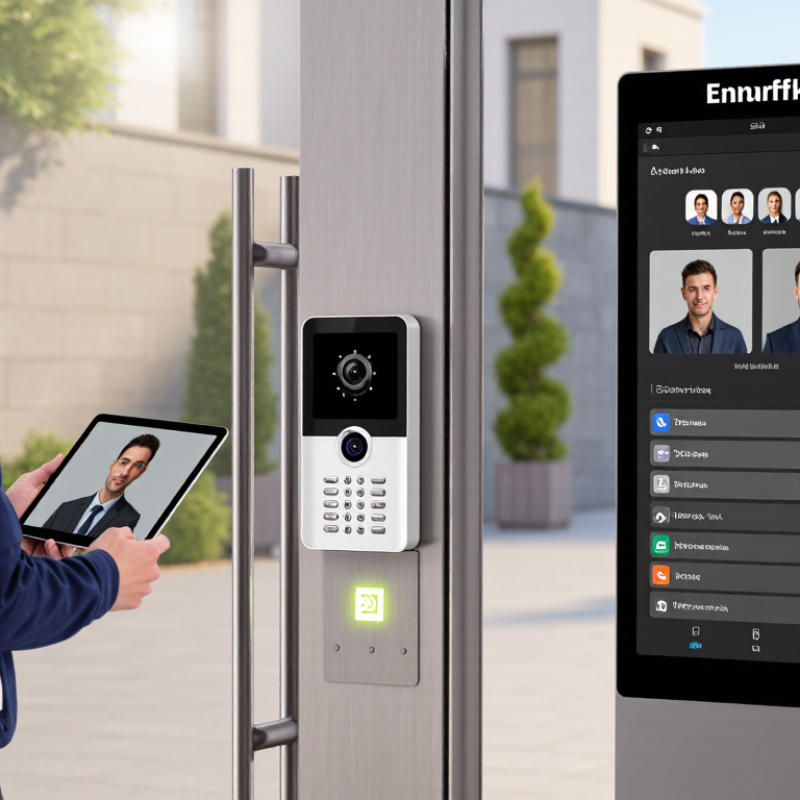
An enforcer video intercom is a security device that combines video observation, two-way communication, and controlled entry. It lets staff see a visitor before responding. The camera may show a face, package, vehicle, or the space behind the caller. A built-in microphone and speaker support clear conversation at the entrance.
In practical security assessments, placement matters as much as the device itself. A unit near eye level can capture clearer facial details. Soft lighting helps at night. Weather-resistant housing protects the system near gates and exposed doors. Authorized staff can review access events, while remote communication reduces unnecessary trips to the entrance. It is a useful layer, not a complete security plan.
It is not flawless.
Poor network coverage can delay video or audio. Bright sunlight may reduce image quality. Some visitors may stand outside the camera’s view. These limits deserve regular testing, especially after construction or seasonal weather changes. Clear instructions also matter, because a hurried operator may unlock the wrong entrance. A dependable installation should consider privacy, accessibility, maintenance, and local requirements before daily use.
Why Choose an Enforcer Video Intercom for Global Security?
What Is an Enforcer Video Intercom?
| Security Dimension | What an Enforcer Video Intercom Is | Why It Matters for Global Security |
|---|---|---|
| Core Function | A communication and access-control device that lets occupants see, speak with, and authorize visitors before granting entry. | Visual verification adds an important security layer beyond audio-only communication or a mechanical doorbell. |
| Video Verification | Typical capabilityLive camera viewing, often with wide-angle coverage, infrared assistance, and optional image recording. | Security staff or residents can assess a visitor’s identity, behavior, and surroundings before opening a door or gate. |
| Two-Way Communication | A speaker and microphone provide hands-free or handset-based conversation between the entrance station and an indoor monitor, phone, or control room. | Users can ask for identification, provide instructions, or communicate with delivery personnel without direct contact. |
| Remote Access Control | The system can operate an electric lock, magnetic lock, gate controller, or door strike after an authorized user approves access. | Remote unlocking reduces the need to physically approach an entrance and supports controlled visitor management. |
| Identification Methods | Depending on the configuration, access may be approved through video verification, PIN entry, proximity credentials, mobile control, or an integrated access-control platform. | Multiple authentication methods allow security procedures to be adapted to homes, offices, apartments, campuses, and industrial sites. |
| Network Connectivity | Modern systems may use wired Ethernet, Power over Ethernet, Wi-Fi, cellular connectivity, or local two-wire communication. | Different connectivity options help deployments work across new construction, retrofit projects, remote locations, and multi-site facilities. |
| Power Options | Common power arrangements include low-voltage DC supplies, Power over Ethernet, local power adapters, and backup batteries where required. | Reliable power design helps preserve communication and entry functions during routine interruptions or emergency conditions. |
| Environmental Protection | Outdoor entrance units are commonly specified with weather-resistant housings, vandal-resistant materials, and protection ratings such as IP65 when certified by the manufacturer. | Appropriate environmental protection supports dependable operation in rain, dust, temperature changes, and high-traffic areas. |
| Night Operation | Infrared illumination, low-light image processing, or integrated lighting can support visitor visibility after dark. | Night-time identification improves safety at entrances that are poorly lit or used outside normal business hours. |
| Event Records | Depending on the system design, calls, access events, snapshots, and video may be stored locally or on an approved network or cloud platform. | Time-stamped records can assist with incident review, visitor accountability, and security investigations, subject to local privacy laws. |
| Integration | Video intercom systems may connect with CCTV, alarm systems, elevator controls, building-management systems, SIP communications, or access-control software. | Integration creates a coordinated security workflow instead of leaving video, communications, and door control in separate systems. |
| Emergency Communication | Some installations include emergency call buttons, control-room communication, door-release monitoring, and fail-safe or fail-secure lock arrangements. | These functions can support faster response and clearer communication during security incidents, medical events, or evacuations. |
| Scalability | A system may be configured for one entrance and one indoor station or expanded to multiple doors, residences, monitors, and security stations. | Scalable architecture helps organizations standardize security procedures across buildings and geographic locations. |
| Accessibility | Visual displays, adjustable audio, tactile controls, captions, and mobile or remote answering options may be included depending on the design. | Accessible communication supports more users and helps facilities align with applicable building and accessibility requirements. |
| Privacy and Compliance | Camera placement, recording settings, retention periods, visitor notices, and access permissions should be configured according to applicable privacy and security regulations. | Responsible deployment reduces privacy risks while preserving the security value of video verification and event records. |
| Typical Applications | Common applications include residential buildings, offices, schools, healthcare facilities, warehouses, gated communities, hotels, and industrial entrances. | The same core platform can support visitor screening, controlled deliveries, staff communication, and perimeter access management. |
| Primary Advantage | It combines visitor video, two-way communication, and controlled door or gate release in one coordinated entrance solution. | This combination can improve situational awareness, reduce unauthorized entry opportunities, and streamline daily access operations. |
| Important Limitation | A video intercom does not replace complete security planning, physical barriers, alarm monitoring, cybersecurity controls, or trained personnel. | Best results come from combining the intercom with appropriate lighting, locks, network protection, access policies, maintenance, and emergency procedures. |
Note: Features, protection ratings, storage methods, connectivity, and operating conditions vary by system configuration. Confirm technical specifications, installation requirements, and legal obligations before deployment.